
Your competitors' ad mistakes are your opening: dead pages, ended offers and sold-out products
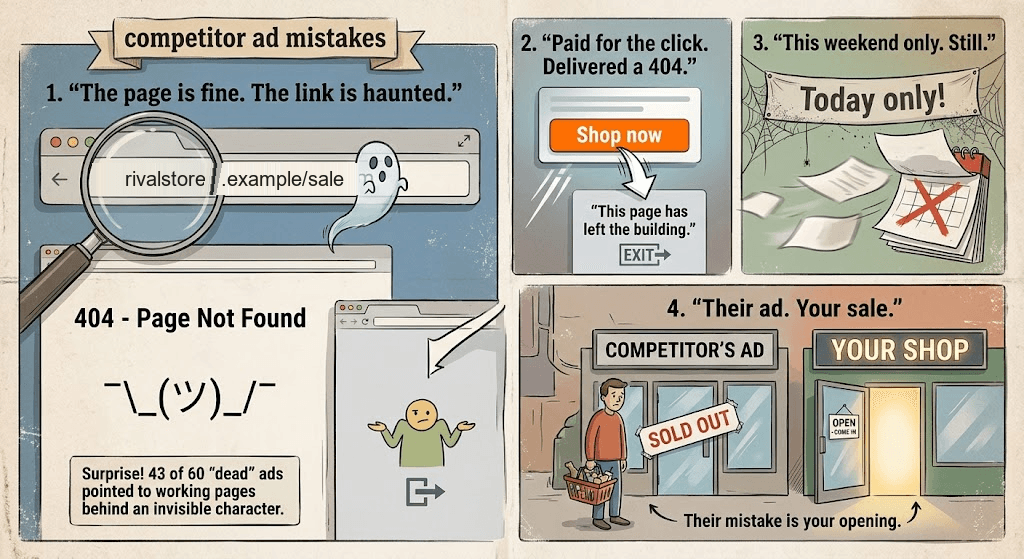
What does a competitor's ad mistake mean for you?
When a rival pays to send shoppers to a missing page, a sold-out product or a deal that has already ended, those shoppers still want the thing they clicked on. If your page for it works, some of them can end up with you. In RivalSweeper's check of 5,896 live Meta ads from November 2 to 4, 2026, fewer than 1 in 100 ads led to an error page, but those ads came from 8 of the 43 stores, about 1 in 5.
Most competitor research looks at what a rival's ads say. This post is about where they lead. You can see any competitor's active ads in Meta's public ads tool (how to do that, for free), but the tool does not tell you whether the page behind the ad still works. That gap is where a rival's mistakes hide, and where your opening is.
What we found when we followed the ads
RivalSweeper follows the live Meta ads of the stores it monitors through redirects and tracking links to the page a shopper actually lands on, and records what that page returns. Of 5,896 live Meta ads whose landing page RivalSweeper checked between November 2 and 4, 2026, across 43 stores, 52 (0.9%) led to a page that returned "not found". In that RivalSweeper check, those 52 ads came from 8 of the 43 stores.
A day later the picture held. A RivalSweeper re-check on November 5 found 60 such ads among 6,202 live Meta ads (1.0%), from 9 of 43 stores. In that RivalSweeper re-check, two stores, one in beauty and one in fashion, accounted for 47 of the 60.
The surprise was why. In RivalSweeper's November 5 re-check, 43 of the 60 error-page ads, from 3 stores, pointed to a page that was working fine: the link pasted into the ad carried an invisible character, such as a zero-width space, so the store answered "not found". Nobody on those teams would see it by reading the ad. The rest were pages that really were gone. The 9 of them that pointed to a product page had been running for a median of 63 days in that RivalSweeper re-check, and the oldest had started in September 2025: the product page was removed, and the ad kept running.
So the mistake is rare per ad and common per store. Most stores get almost all of their links right, yet about 1 in 5 stores in RivalSweeper's November 2 to 4 check had at least one live ad sending shoppers to an error page.
One more number keeps this honest. In the November 2 to 4 RivalSweeper check, 547 of the 5,896 ads (9%) could not be checked because the store blocks automated visits. RivalSweeper counts those ads in the total but never as broken, so the real share of dead links could be higher than 0.9%.
How we counted: an ad is live when RivalSweeper has seen it running in the last 3 days. "Error page" means the link returned "not found" or a similar client error, or its domain no longer exists. Links to app stores are left out, because they open an app, not a web page. The stores are ones RivalSweeper monitors, mostly fashion, home and beauty retailers, plus jewelry, electronics and a few others; they are not named here, and RivalSweeper never publishes which brands have broken or expired ads.
Why a rival's dead ad is your opening

A shopper who clicks an ad and lands on an error page has already done the hard part: they wanted the product. The rival paid to bring that shopper in and lost them at the door. Here is how you can make the most of it, fairly.
1. Be the working page for the same need
Look at what the dead ad was selling: a product type, a category, a seasonal edit. Then check your own version of it. Is your page live, in stock, and reachable in one click from your ads, your homepage and search? A shopper who bounces off a rival's error page may search again, and the store with the working page is the one that can get the second look.
2. Put budget behind the same intent
If a rival's ads for a category keep landing on dead pages, that category may have shoppers they are not serving well. That can be a good week to raise your own spend on it, in your own words and on your own product terms. Compete on the need, not on their brand name.
3. Time your promotion, and don't match a deal that is over
An ad can keep running after the offer printed in it has ended. When a rival's sale is over but its ad still promises it, shoppers arrive expecting a discount that is gone. That is a natural moment for your own offer. It also saves you money: an offer that has already ended is not one you need to match. Windows like this close fast, since the median Meta ad that ended in September 2026 had run for just 6 days, across 6,855 ended ads from brand-verified advertisers among the stores RivalSweeper tracks (How long do Meta ads run?).
4. Fix your own ads first
Every mistake on this list happens to good teams, because pages change faster than ads do. A product sells out, a collection is renamed for the new season, an invisible character slips into a pasted link, a sale ends on Sunday and the creative keeps saying it is on. Before you read anything into a rival's dead ads, make sure you are not the store with the dead ads. RivalSweeper runs the same check on your own store, and puts your dead links, sold-out products and expired or never-ending offers in your to-do list as fixes.
Six ad mistakes you can spot on a competitor
These are the mistakes RivalSweeper's Ad & Deal Health check looks for today, on your ads and on every competitor you monitor. Each ad finding carries its evidence: the public link to the ad, the landing URL, the result of the check and its date; a banner finding carries the banner text and when it was last seen.
| The mistake | How it is spotted | Your opening |
|---|---|---|
| Ad leads to an error page | The landing page returns an error such as "not found" or "gone", or the domain no longer exists. Often the page itself is fine, but the link pasted into the ad carries an invisible character that breaks it; RivalSweeper flags that too. | The shopper still wants the product. Make sure your page for it works. |
| Deep link falls back to the homepage | The ad links to a specific page, but the shopper is sent to the homepage instead, usually because that page was removed. | The shopper has to search again. Be easy to find for the same product. |
| Ad promotes a sold-out product | The ad lands on a product page that shows the product as out of stock. | Unmet demand for that product type. Check your stock and visibility. |
| Product priced at zero | The ad lands on a product page showing a price of zero. | The shopper cannot buy there. A clear price on your page wins the comparison. |
| Offer still advertised after it ended | An end date printed in the ad copy, the ad image or a homepage banner has passed, but the ad or banner is still live. | Time your own offer, and don't match one that is over. |
| Urgency that never ends | A short-lived claim such as "this weekend only" is still running more than a week after its own window closed. | Shoppers learn to ignore it. Honest deadlines on your side stand out. |
The last one is more than a missed sale. Under the EU's Unfair Commercial Practices Directive, falsely stating that a product or its terms will only be available for a very limited time, to push an immediate decision, is a practice banned in all circumstances (Directive 2005/29/EC, Annex I, point 7), and an urgency claim that never ends can fall under it. That is one more reason to check your own "today only" ads before anyone else does.
What the check will not tell you
- Blocked pages are not verdicts. When a store blocks automated visits, the ad is shown as not verifiable, never as broken.
- Old stock data is not used. Stock or price that RivalSweeper has not read in the last 7 days is never reported as a problem.
- Landing-page checks cover Meta ads. RivalSweeper records competitors' Google ads activity too, but it follows only Meta ads to their landing page today.
- It cannot see results. Nobody outside the advertiser and Meta can see how many people clicked a commercial ad or what it cost (what Meta's public tool shows and hides), so a dead ad tells you clicks were wasted, not how many.
Where the line is
Using a rival's mistake means serving the shopper better. It does not mean making the mistake worse.
- Don't click their ads. Clicking a competitor's ads to run up their costs is click fraud, and ad platforms treat it as invalid traffic; Google, for one, lists manual clicks that increase ad costs as invalid clicks (Google Ads Help).
- Don't try to get their ads pulled. Flagging a rival's ads to the platform to slow them down is not a strategy. Spend that time on your own pages.
- Don't call it out in public. No "their link is broken, ours works" ads or posts. Shoppers remember who was petty.
- Don't copy their creative or use their brand name. Compete on the product type and on your own offer.
A 15-minute weekly routine
- Start with your own ads. Fix every dead page, sold-out product and ended offer on your side first.
- Scan your competitors' findings. Note which product types and categories their dead or expired ads were selling.
- Check your matching pages. Live, in stock, priced, and one click from your ads and homepage.
- Decide on budget and timing. Is this the week to push that category, or to launch your own offer while theirs is over?
- Look again next week. Pages change every week, and so do the mistakes.
RivalSweeper runs the checks behind steps 1 and 2 for your store and every competitor you monitor, re-checks landing pages on a rolling basis, and keeps each finding with its date and evidence, so the routine starts from a list instead of a pile of ad links.
Frequently asked questions
How often do live ads lead to an error page?
Rarely per ad, often per store. Of 5,896 live Meta ads whose landing page RivalSweeper checked between November 2 and 4, 2026, 52 (0.9%) led to a page that returned "not found", and those ads came from 8 of the 43 stores checked. A RivalSweeper re-check on November 5 found 60 of 6,202 (1.0%), from 9 of 43 stores, and in that re-check 43 of the 60 were working pages behind a broken link: the link pasted into the ad carried an invisible character.
Why does an ad link to a working page show an error?
Often because of a character you cannot see. A zero-width space or a stray blank pasted into the ad's link makes the store answer "not found", although the page itself is fine. In RivalSweeper's November 5 re-check, 43 of 60 live Meta ads that led to an error page had such a character in their link. Copy the link from the live ad itself and test it, not the one in your campaign notes.
What should I do when a competitor's ad points to a dead page?
Make sure the shopper who bounces finds you: check that your own page for the same product type is live, in stock and easy to reach from your ads and from search. Then check your own ads for the same mistake. Never click a rival's ads to run up their costs: that is click fraud, and ad platforms treat such clicks as invalid.
Which competitor ad mistakes can RivalSweeper detect?
RivalSweeper's Ad & Deal Health check flags live Meta ads that land on an error page, a deep link that now falls back to the homepage, a sold-out product or a product priced at zero, plus ads and homepage banners still showing an offer after its printed end date, and short-lived urgency claims still running more than a week after their own window closed.
Should I match a competitor's discount if their ad is still running?
Not before you check that the offer is still on. An ad can keep running after the offer printed in it has ended, and an offer that is already over is not one you need to match.
Why are some ads marked as not verifiable?
Some stores block automated visits, so the landing page cannot be seen. In RivalSweeper's November 2 to 4 check, 547 of 5,896 live Meta ads (9%) were blocked this way; RivalSweeper shows them as not verifiable and never counts them as broken.
Free research report
Get the September 2026 Online Retail Radar
Anonymized September numbers from the stores we track: how many ran ads and how long the ads lasted, AI-agent readiness scores, payment methods and shipping carriers, and how new stores launched. We email you the link to the full report.
Prefer to skim first? Read the summary.